Arrange Master v1.3.0: Chromium Integration and Smart Euclidean Nesting

The release of Arrange Master v1.3.0 introduces a fundamental architectural shift. By moving mathematical operations outside of the native Illustrator environment, the plugin achieves exact vector interlocking without standard processing delays. Here is a technical overview of the new algorithms and system changes.
1. Dense Packing Support in Shape Respect
Shape Respect layout now fully supports True-Shape Nesting (Dense Packing). Previously, this method evaluated objects based on their rectangular bounding boxes. Now, it calculates the exact vector contours of the items and fits them inside custom, non-rectangular containers.
The engine rasterizes the container geometry mathematically. It identifies the outer shell and detects any internal isolated cavities (holes). The algorithm applies the defined Min. Spacing to both the outer boundaries and the edges of internal holes, preventing objects from overlapping with empty container spaces.

2. Chromium Engine Offloading
Adobe Illustrator’s native ExtendScript environment is single-threaded and struggles with heavy float-array calculations. Calculating collision matrices for complex vectors using ExtendScript often caused the host application to freeze.
To solve this computational bottleneck, Arrange Master v1.3.0 extracts the raw vector coordinates and offloads them to the Chromium Engine built into the CEP panel framework. It executes the RLE (Run-Length Encoding) math in milliseconds and returns the final X/Y coordinates and rotation angles to Illustrator.
3. Smart Euclidean Packing (< 50 Items)
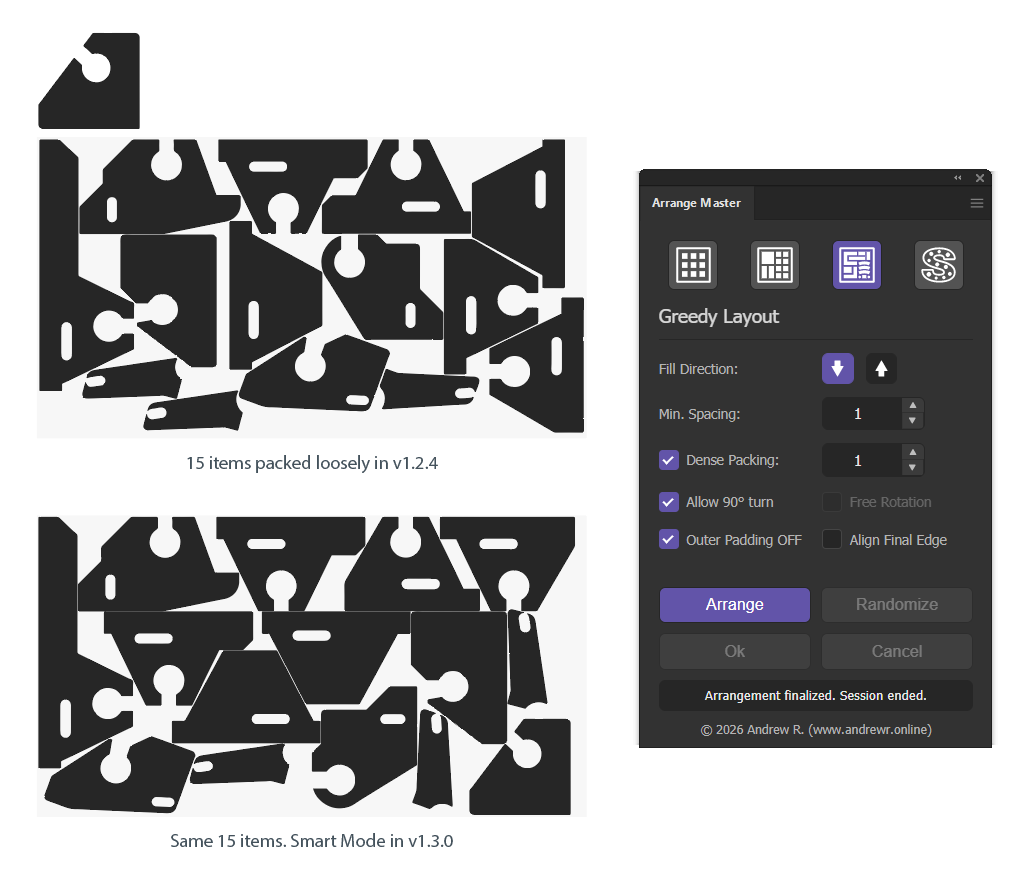
Previous versions of Arrange Master utilized a lexicographical line-packing heuristic. This prioritized calculation speed and performed efficiently for large batches (100+ items of varying sizes). However, users arranging small batches (20–30 items of similar size) observed loose layouts and empty gaps.
Version 1.3.0 introduces a conditional algorithm shift. If the selection contains fewer than 50 items, the engine automatically activates Smart Mode. Instead of placing an object in the first available gap, it uses Pure Euclidean Scoring. It evaluates the radial distance (X² + Y²) of every valid coordinate and selects the placement that minimizes the total cluster footprint. This mathematical model forces similar objects (like interlocking trapezoids) to nest tightly against each other.
4. Silhouette Extraction for High-Density Geometry
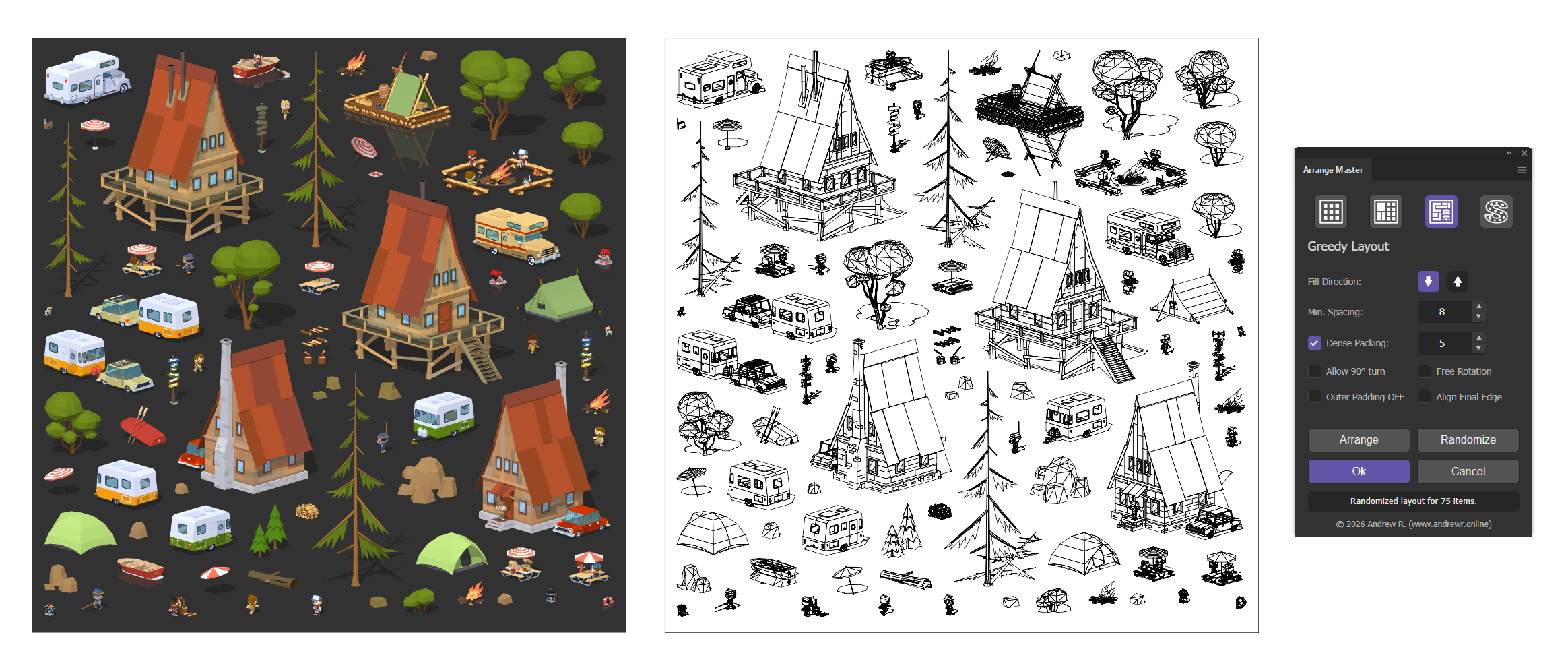
Vector objects generated via Image Trace or exported from 3D software (like SketchUp) frequently consist of thousands of individual micro-paths. Previously, the engine iterated through every internal path to build the collision matrix, which could force Illustrator into 20-minute calculation loops.
The new pipeline utilizes a dynamic path-count threshold. If an object contains more than 150 internal paths, Arrange Master bypasses manual DOM iteration. Instead, it uses Illustrator's native Pathfinder (Boolean operations) to instantly merge the geometry into a single solid outer silhouette.
This single contour is sent to the Chromium Engine. As a result, extraction time drops from minutes to seconds. Furthermore, the geometry is cached in the active session—meaning subsequent clicks on "Arrange" or "Randomize" with new spacing parameters execute instantly.
5. UI Color Coding
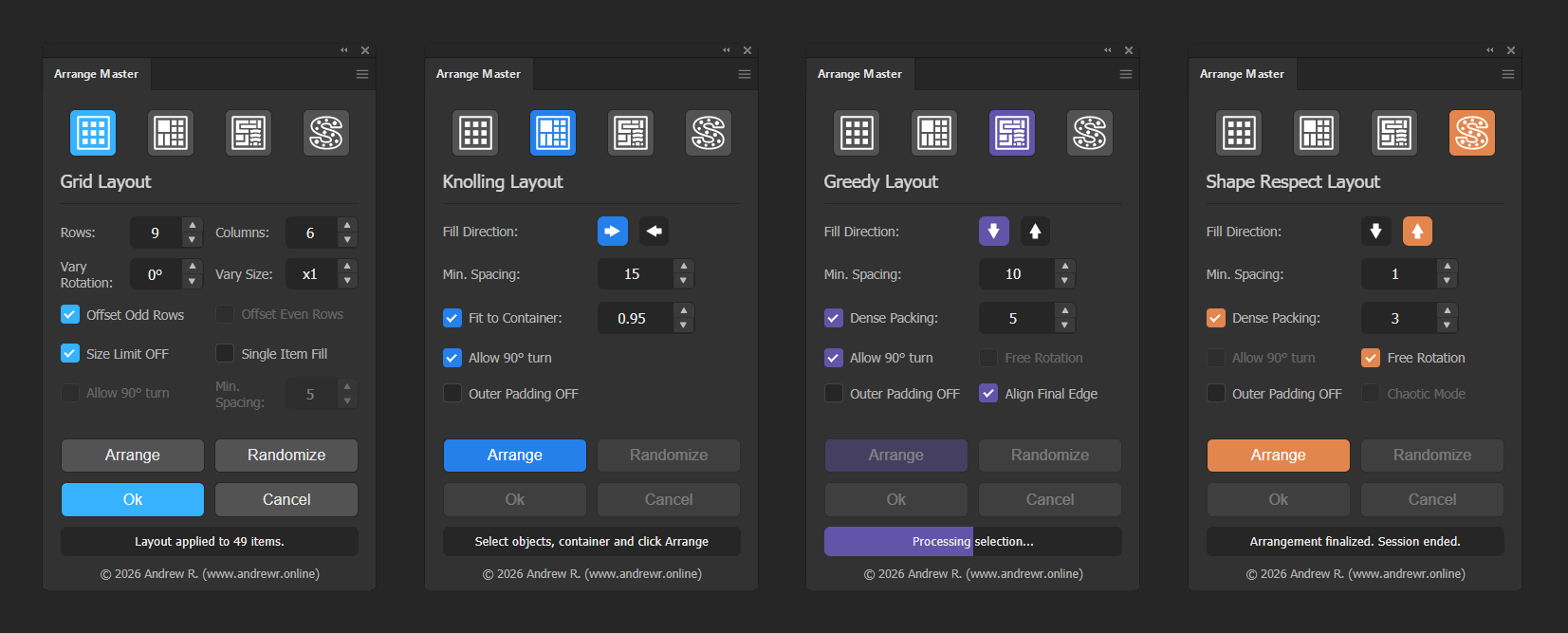
With the integration of Dense Packing and Free Rotation into the Shape Respect panel, its interface became nearly identical to the Greedy Layout panel.
To prevent workflow errors and visual confusion, v1.3.0 introduces UI color coding. Active panel accents (checkboxes and buttons) now map to specific hex codes:
Grid Layout: Light Blue
Knolling Layout: Blue
Greedy Layout: Purple
Shape Respect: Orange
Core Capabilities Overview
Alongside the new v1.3.0 updates, Arrange Master maintains its baseline feature set:
Grid Layout: Fixed row/column distribution with size-limit overrides and single-item duplication.
Knolling Layout: Maximal Empty Rectangles (MER) logic for bounding box packing with two-pass gap filling.
Clipping Mask Resolution: Recursive DOM parsing that calculates true visual bounds, ignoring hidden clipping mask contents that artificially inflate standard bounding boxes.
Session Safety: Non-destructive processing that isolates original items on a hidden layer until the user clicks "Ok".